




前言
在 pc上,你要使用flutter来创建网页。特别是在清理时,由于局部的变数被清除,会造成网页问题,因此必须要注意到全局的高速缓存。
通常,我们使用导航器来切换网页:
Navigator.of(context).pushNamed(String routeName, {Object? arguments,});这样,参数就可以被传递,并且可以在新的页面上通过 ModalRoute. of (context).settings.ar gume nts来获得传递参数并使用。但是如果是web页面,通过浏览器刷新后发现arguments变成null的,所以说flutter内部并没有将这部分持久化,刷新就被清空了,这样就导致页面出错。
同时,当我们使用静态变量保存某些全局信息时,它也会在刷新时被清除,这也会造成问题。

因此,储存在记忆体中的资料并不是绝对安全的,因为很显然,这些资料会被清除掉,所以,当你想要保存这些资料时,必须要用某种方式来保存。
url
通常,我们用上述方法来转换网页,此时 routeName就是网页的名字。但是因为这是一个字符串,所以我们可以将页面名称和参数组合成一个url来代替routeName。不过,在应用程序中,我们也要做一些修改,首先要用 url来获得网页的名字,然后再创建一个网页,然后将这些参数分析出来。在浏览网页时,可以看到在地址栏中的 url后面有一个参数,而在刷新的时候,这些参数就不会被删除,然后页面会再次执行 route操作。
在此,我们解决了一个问题,就是在页面转换中,参数的问题,但不能处理所有的数据,而且由于 url长度的限制,不能传输太多的信息。
所以就需要持久化存储:LocalStorage
Local Storage
LocalStorage是window的一个字段,需要引入html,如下:
import 'dart:html';...var local = windows.localStorage或
import 'dart:html' as html;...var local = html.windows.localStorage它是一个Storage类,定义了”[]”运算符,所以可以像map那样使用即可,如下:
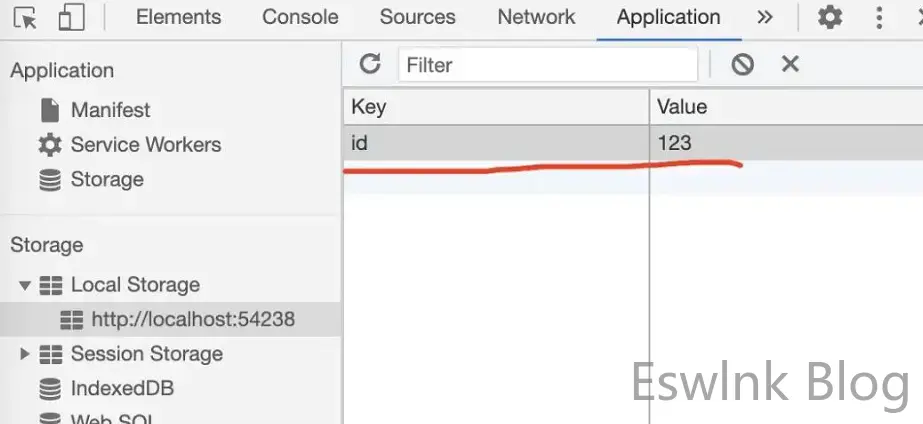
//存储"id"这个key的value设置为“123”window.localStorage["id"] = "123";//取出“id”这个key的value使用Text(window.localStorage["id"])是不是非常简单。存储后我们通过chrome的开发者工具,就可以看到这个存储了,如下:
Cookie Store
注意,windows还有cookieStore用于管理cookie,但是在测试时设置cookie会失败报错,代码:
window.cookieStore.set("id", "123");报错
Can not modify a secure cookie on insecure origin这样导致cookie存储不上,这是因为我们测试时域名是http://localhost:xxxx ,chrome认为是不信任的网站。发布到正式环境换成https后应该可以,不过这里我没有测试,LocalStorage基本就满足我的持久化需求了,所以暂时还没有使用cookieStore。
再补充一下cookie的获取,通过getAll函数获取cookies,注意这个函数是异步的所以返回的是Future对象,返回的值是一个object数组,每个object对应一个cookie,如下:
[ { "domain": null, "expires": 1712743928000, "name": "p_h5_u", "path": "/xxx/dev", "sameSite": "lax", "secure": false, "value": "26EC4EAC-1537-4A7A-B813-0F2171704651" }]所以我们如果要获取具体某一个cookie的值,则需要进行遍历,代码如下:
cookie.getAll().then((value) => { value.forEach((item){ if(item.name == "UCENTER_IUCTOKEN"){ showToast(item.value); } })});这里我们获取的是cookies中UCENTER_IUCTOKEN对应的值。
后退
浏览器的后退操作和刷新一样是常用操作,但是有时候我们并不想回退到上一页,比如在当前页面弹窗提示用户是否返回。这样就需要我们拦截处理后退操作,通过WillPopScope来实现。
将WillPopScope设置根组件,将页面所有组件放到它里面,然后实现它的onWillPop回调,代码如下:
import 'dart:html';
import 'package:flutter/cupertino.dart';import 'package:flutter/material.dart';
class PageC extends StatefulWidget{
  @override  State<StatefulWidget> createState() {    return _PageC();  }}
class _PageC extends State<PageC>{  int count = 3;  @override  Widget build(BuildContext context) {    return WillPopScope(      child: Scaffold(          body: Column(            children: [              Text(""),              RaisedButton(                child: Text("like"),                onPressed: (){
                },              ),            ],          ),
      ),      onWillPop: _requestPop,    );  }
  Future<bool> _requestPop() {    count--;    print("$count");    if(count == 0){      return new Future.value(true);    }    else {      return new Future.value(false);    }  }}
当返回false的时候就拦截了系统的回退操作,当返回ture则正常回退。
这里我们做一个计数,当点击第三次再执行退出。
但是这里有一个问题,点击返回按钮后,虽然拦截了不会回退到上一页面,但是地址栏中的url变成了首页的url,但是页面还是当前页面,而且点击三次后确实返回了上一页,但是刷新就出问题了。因为url变成了首页,所以一刷新就便会首页了,而不是显示当前页面。
经过反复测试,发现了一个解决方案,就是重新修改history,history也是window的一个字段,对应的就是html中的history api,通过它的源码可以看到它提供的几个函数最终都是通过native方法调用原生来实现的,如下:
class History extends Interceptor implements HistoryBase {  /**   * Checks if the State APIs are supported on the current platform.   *   * See also:   *   * * [pushState]   * * [replaceState]   * * [state]   */  static bool get supportsState => JS('bool', '!!window.history.pushState');  // To suppress missing implicit constructor warnings.  factory History._() {    throw new UnsupportedError("Not supported");  }
  int get length native;
  String? get scrollRestoration native;
  set scrollRestoration(String? value) native;
  dynamic get state =>      convertNativeToDart_SerializedScriptValue(this._get_state);  @JSName('state')  @annotation_Creates_SerializedScriptValue  @annotation_Returns_SerializedScriptValue  dynamic get _get_state native;
  void back() native;
  void forward() native;
  void go([int? delta]) native;
  @SupportedBrowser(SupportedBrowser.CHROME)  @SupportedBrowser(SupportedBrowser.FIREFOX)  @SupportedBrowser(SupportedBrowser.IE, '10')  @SupportedBrowser(SupportedBrowser.SAFARI)  void pushState(/*SerializedScriptValue*/ data, String title, String? url) {    var data_1 = convertDartToNative_SerializedScriptValue(data);    _pushState_1(data_1, title, url);    return;  }
  @JSName('pushState')  @SupportedBrowser(SupportedBrowser.CHROME)  @SupportedBrowser(SupportedBrowser.FIREFOX)  @SupportedBrowser(SupportedBrowser.IE, '10')  @SupportedBrowser(SupportedBrowser.SAFARI)  void _pushState_1(data, title, url) native;
  @SupportedBrowser(SupportedBrowser.CHROME)  @SupportedBrowser(SupportedBrowser.FIREFOX)  @SupportedBrowser(SupportedBrowser.IE, '10')  @SupportedBrowser(SupportedBrowser.SAFARI)  void replaceState(/*SerializedScriptValue*/ data, String title, String? url) {    var data_1 = convertDartToNative_SerializedScriptValue(data);    _replaceState_1(data_1, title, url);    return;  }
  @JSName('replaceState')  @SupportedBrowser(SupportedBrowser.CHROME)  @SupportedBrowser(SupportedBrowser.FIREFOX)  @SupportedBrowser(SupportedBrowser.IE, '10')  @SupportedBrowser(SupportedBrowser.SAFARI)  void _replaceState_1(data, title, url) native;}
这样我们就可以通过它来处理history了,在html中我们知道replaceState就是将当前的url改成一个新的url,我们就通过这个来纠正上面url的问题,修改_requestPop()代码如下:
Future<bool> _requestPop() { History history = window.history; count--; print("$count"); if(count == 0){ return new Future.value(true); } else { setState(() { history.replaceState(null, null, "#pageC"); }); return new Future.value(false); } }可以看到在返回false之前,通过replaceState重新将当前url改回原url,这样点击后退键的时候url就还保持原样,不会变成首页url,刷新就没有问题了。
刷新后后退
在上步中其实没有完全解决问题,问题在刷新后再后退,这不仅仅是拦截后退操作时存在的问题。实质是因为在任何情况下点击浏览器刷新后,flutter应用是重新启动的,所以内存全部丢失,这也是上面全局缓存的原因。
除了全局变量,其实还影响着flutter的Navigator,我们来看Navigator的push源码:
@optionalTypeArgsFuture<T?> pushNamed<T extends Object?>( String routeName, { Object? arguments,}) { return push<T>(_routeNamed<T>(routeName, arguments: arguments)!);}继续
@optionalTypeArgsFuture<T?> push<T extends Object?>(Route<T> route) { _pushEntry(_RouteEntry(route, initialState: _RouteLifecycle.push)); return route.popped;}继续
void _pushEntry(_RouteEntry entry) {assert(!_debugLocked);assert(() {_debugLocked = true;return true;}());assert(entry.route != null);assert(entry.route._navigator == null);assert(entry.currentState == _RouteLifecycle.push);_history.add(entry);_flushHistoryUpdates();assert(() {_debugLocked = false;return true;}());_afterNavigation(entry.route);}
可以看到Navigator内部用一个_history来维护历史路径,这个_history是一个list而已,如下
List<_RouteEntry> _history = <_RouteEntry>[];而pop代码如下:
@optionalTypeArgsvoid pop<T extends Object?>([ T? result ]) { assert(!_debugLocked); assert(() { _debugLocked = true; return true; }()); final _RouteEntry entry = _history.lastWhere(_RouteEntry.isPresentPredicate); if (entry.hasPage) { if (widget.onPopPage!(entry.route, result)) entry.currentState = _RouteLifecycle.pop; } else { entry.pop<T>(result); } if (entry.currentState == _RouteLifecycle.pop) { // Flush the history if the route actually wants to be popped (the pop // wasn't handled internally). _flushHistoryUpdates(rearrangeOverlay: false); assert(entry.route._popCompleter.isCompleted); } assert(() { _debugLocked = false; return true; }()); _afterNavigation(entry.route);}可以看到也是通过_history来实现的。
当我们刷新后,实际上flutter重启了,这时候_history是空的,而因为浏览器记录了当前的url,所以会加载这个url对应的页面,这样_history就只有一个当前页面的router(注意,这时候浏览器的history其实是完整的,但是因为回退时直接交给flutter处理了,浏览器的history没有用到),所以执行pop就会出问题,因为没有上一页了,所以没有执行任何动作,但是当前页面内容清空,变成空白的。
而浏览器回退按钮则有不同,并不是直接执行pop,而是一系列调用,源头在widgets/binding.dart中
mixin WidgetsBinding on BindingBase, ServicesBinding, SchedulerBinding, GestureBinding, RendererBinding, SemanticsBinding {  @override  void initInstances() {    super.initInstances();    _instance = this;
    assert(() {      _debugAddStackFilters();      return true;    }());
    // Initialization of [_buildOwner] has to be done after    // [super.initInstances] is called, as it requires [ServicesBinding] to    // properly setup the [defaultBinaryMessenger] instance.    _buildOwner = BuildOwner();    buildOwner!.onBuildScheduled = _handleBuildScheduled;    window.onLocaleChanged = handleLocaleChanged;    window.onAccessibilityFeaturesChanged = handleAccessibilityFeaturesChanged;    SystemChannels.navigation.setMethodCallHandler(_handleNavigationInvocation);    FlutterErrorDetails.propertiesTransformers.add(transformDebugCreator);  }  ...
这里我们看到有这样一行代码:
SystemChannels.navigation.setMethodCallHandler(_handleNavigationInvocation);这是与native进行交互,或者当收到native的相关事件就会执行_handleNavigationInvocation
Future<dynamic> _handleNavigationInvocation(MethodCall methodCall) { switch (methodCall.method) { case 'popRoute': return handlePopRoute(); case 'pushRoute': return handlePushRoute(methodCall.arguments as String); case 'pushRouteInformation': return _handlePushRouteInformation(methodCall.arguments as Map<dynamic, dynamic>); } return Future<dynamic>.value();}浏览器的回退按钮就是一个popRoute事件,所以执行handlePopRoute
@protectedFuture<void> handlePopRoute() async { for (final WidgetsBindingObserver observer in List<WidgetsBindingObserver>.from(_observers)) { if (await observer.didPopRoute()) return; } SystemNavigator.pop();}继续执行didPopRoute,这个函数在widgets/app.dart中实现
@overrideFuture<bool> didPopRoute() async {  assert(mounted);  // The back button dispatcher should handle the pop route if we use a  // router.  if (_usesRouter)    return false;
  final NavigatorState? navigator = _navigator?.currentState;  if (navigator == null)    return false;  return await navigator.maybePop();}
这样就进入到Navigator中了
@optionalTypeArgsFuture<bool> maybePop<T extends Object?>([ T? result ]) async { final _RouteEntry? lastEntry = _history.cast<_RouteEntry?>().lastWhere( (_RouteEntry? e) => e != null && _RouteEntry.isPresentPredicate(e), orElse: () => null, ); if (lastEntry == null) return false; assert(lastEntry.route._navigator == this); final RoutePopDisposition disposition = await lastEntry.route.willPop(); // this is asynchronous assert(disposition != null); if (!mounted) return true; // forget about this pop, we were disposed in the meantime final _RouteEntry? newLastEntry = _history.cast<_RouteEntry?>().lastWhere( (_RouteEntry? e) => e != null && _RouteEntry.isPresentPredicate(e), orElse: () => null, ); if (lastEntry != newLastEntry) return true; // forget about this pop, something happened to our history in the meantime switch (disposition) { case RoutePopDisposition.bubble: return false; case RoutePopDisposition.pop: pop(result); return true; case RoutePopDisposition.doNotPop: return true; }}上面我们知道刷新后_history中只有当前页面的router,这时候disposition就是RoutePopDisposition.bubble,我们看它的解释
/// Delegate this to the next level of navigation.////// If [Route.willPop] returns [bubble] then the back button will be handled/// by the [SystemNavigator], which will usually close the application.会关闭当前应用,但是浏览器并未关闭,所以会重新加载默认页面。注意这与上面pop结果是不一样的,因为这时候还没有执行pop,而且也不会执行到pop了。如果是正常情况下_history有上一页记录,disposition是RoutePopDisposition.pop就会执行pop了。
对于这个问题很多人也在github的flutter项目中反馈 https://github.com/flutter/flutter/issues/59277
正式的解决方案是使用Navigator2.0
这里面我提到,Navigator2.0在浏览器回退按钮的处理上又与Navigator1.0不同,点击回退按钮时Navigator2.0并不是执行pop操作,而是执行setNewRoutePath操作,本质上应该是从浏览器的history中获取上一个页面的url,然后重新加载。这样确实解决了刷新后回退的问题,因为刷新后浏览器的history并未丢失,但是也导致了文章中我们提到的flutter中的页面栈混乱的问题。
那么Navigator2.0为什么与Navigator1.0不同?
实际上Navigator2.0与Navigator1.0一样,也是通过native调用_handleNavigationInvocation
Future<dynamic> _handleNavigationInvocation(MethodCall methodCall) { switch (methodCall.method) { case 'popRoute': return handlePopRoute(); case 'pushRoute': return handlePushRoute(methodCall.arguments as String); case 'pushRouteInformation': return _handlePushRouteInformation(methodCall.arguments as Map<dynamic, dynamic>); } return Future<dynamic>.value();}但是在2.0中methodCall.method是pushRouteInformation,所以执行了_handlePushRouteInformation,这样就导致了与Navigator1.0的不同。而_handlePushRouteInformation就是执行了push流程,这里就不详细说了,所以最后执行了setNewRoutePath,这样也导致了文章中提到的问题
图解
最后我们详细的展示两种方式在这个过程中的效果,以便更清晰的看到问题所在。假设有三个页面A,B,C。打开顺序是A -> B -> C。
1)Navigator1.0
正常打开
Navigator中是A -> B -> C(浏览器中history是 A -> B -> C)
点击刷新后
Navigator中是C(浏览器中history是 A -> B -> C)
再点击回退活执行pop都会出现问题
2)Navigator2.0
正常打开
stack中是A -> B -> C(浏览器中history是 A -> B -> C)
点击刷新后
stack中是C(浏览器中history是 A -> B -> C)
点击回退的情况是
stack中是C -> B(浏览器中history是 A -> B)
所以Navigator2.0可以解决这个问题,但是因为是执行setNewRoutePath,所以stack是错的
执行pop的情况是
因为本质上还是通过Navigator,所以同样会执行到Navigator的maybePop,而这时_history只有C页面,所以同样是RoutePopDisposition.bubble,结果就是页面没有任何反应。
回到最开始的A -> B -> C,如果不刷新,点击回退后是
stack中是A -> B -> C -> B(浏览器中history是 A -> B )
这时候虽然页面表现没问题,但是stack同样是错的
这时候如果执行pop,情况是
stack中是A -> B -> C (浏览器中history是 A -> B -> C )
可以看到并没有返回A页面,而是返回了C页面,所以这是有问题的
这就是Navigator2.0自身存在的问题,在文章中也提到了这个问题同样很多人提出了issue,google也注意到了,但是目前还未解决。关键是在setNewRoutePath的时候我们无法判断是回退键导致的还是真正的新页面,所以无法区分处理。
(这里其实有一个不完善的解决方案,就是在setNewRoutePath时,将新的url与_stack中的对比,如果有说明是回退操作,将_stack中它前面的都移除。但是这要求我们的每个页面在栈中时唯一的,无法同时出现两个相同的页面,如果应用相对简单其实是可以考虑这种方案的)
总结
所以总结就是,目前flutter web对于浏览器还是没有适配完全,无论Navigator1.0还是Navigator2.0,都存在不可解决的严重问题。目前来看google的对flutter web的意图,还是开发移动web并在App中通过webkit这种内核使用,并没有想开发者使用flutter web来开发真正的web应用,或者后续会完善这部分。



评论 (0)