


智能摘要 AI
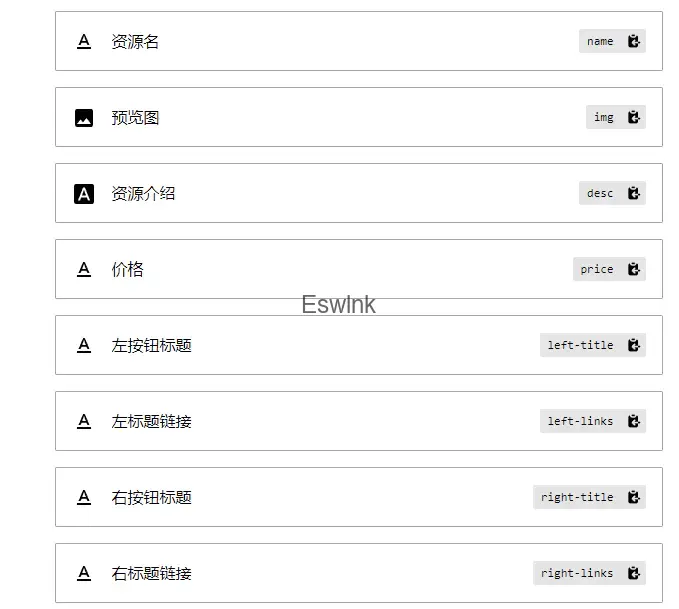
本文介绍了仿制的一个区块,用于展示主题。区块依赖于「Genesis Custom Blocks PRO」插件,并展示了其在电脑端的效果。HTML代码构建了区块的布局结构,包括左侧的模拟图和右侧的主题描述、价格及按钮区域。CSS代码则定义了区块的样式,如阴影效果、布局比例、字体大小及颜色等,并提供了移动端自适应样式。相关字段图展示了区块中使用的变量和参数。
前言
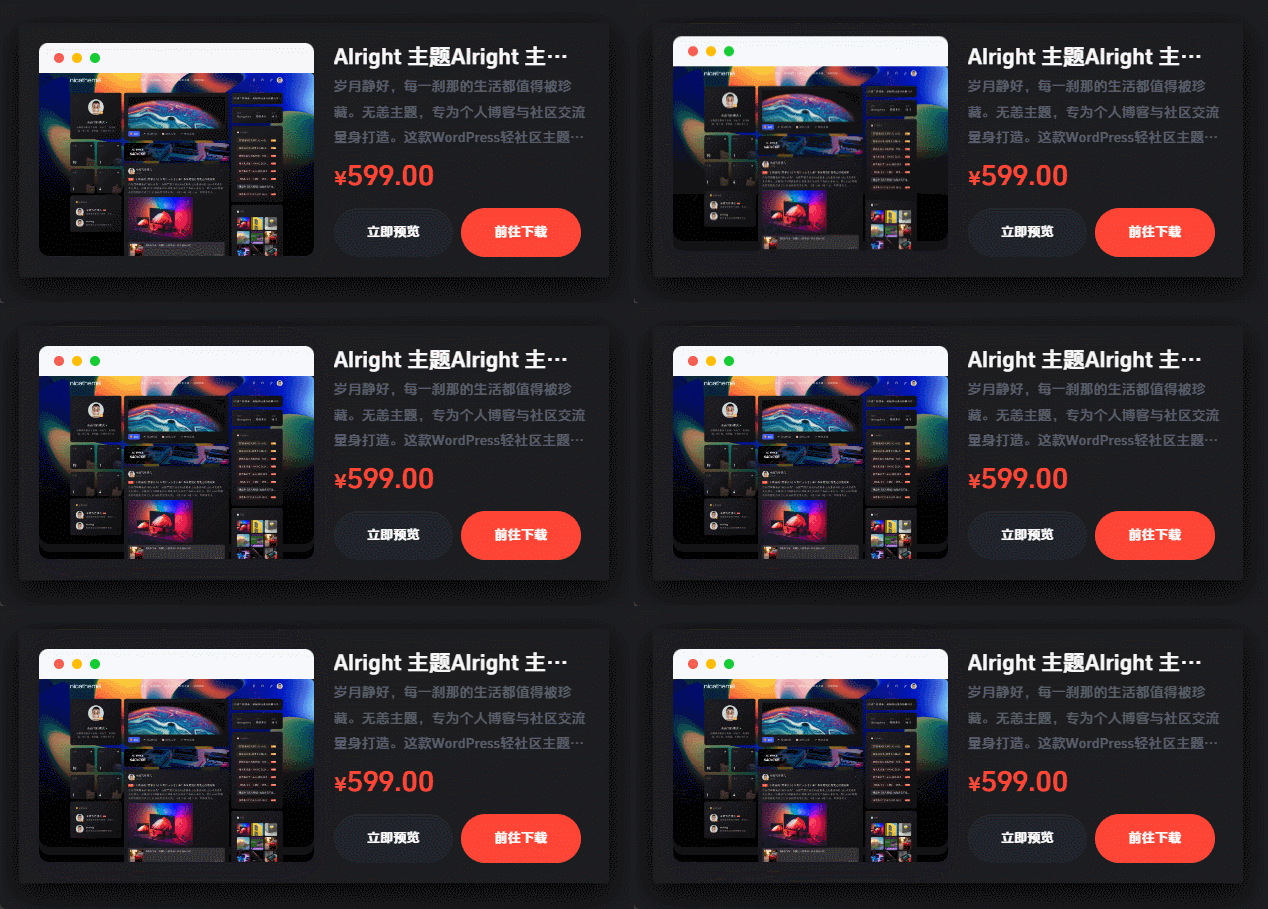
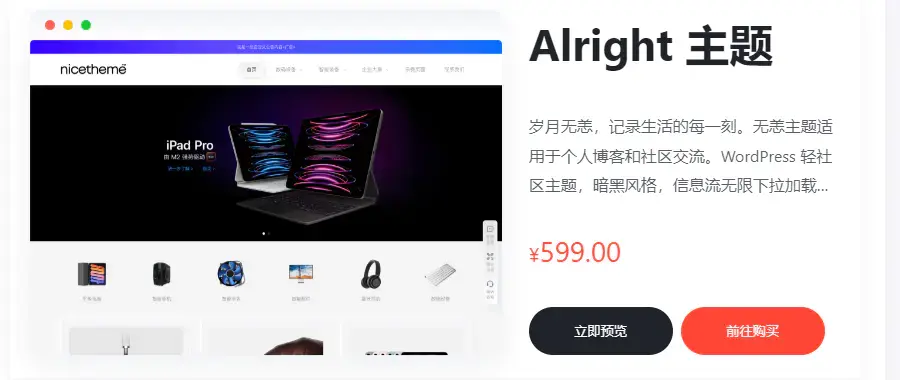
之前就想要仿一个区块用来展示主题,今天就把他完工,以下是展示效果:
相关代码
区块依赖于「Genesis Custom Blocks PRO」,可通过搜索或者通过以下链接直达区块教程:
Markup
  <div class="theme-container box-shadow">


    <!-- 布局左边 -->
    <div class="theme-mockups">
      <div class="mockup-browser mockup-hover">
        <div class="mockup-dots">
          <i class="dot1"></i>
          <i class="dot2"></i>
          <i class="dot3"></i>
        </div>
        <div class="mockup-poster" style="background-image: url('{{img}}')"></div>
      </div>
    </div>

    <!-- 布局右边 -->

    <div class="theme-description">
      <div class="theme-summary">
        <div class="theme-title">{{name}}</div>
        <div class="theme-desc text-secondary">{{desc}}</div>
        <div class="font-number text-danger"><span class="text-lg">¥</span><span class="text-xxl">{{price}}</span>
        </div>

        <!-- 按钮区域 -->
        <div class="theme-action">
          <div class="theme-flex">
            <div class="button-left">
              <a href="{{left-links}}" target="_blank"
                class="preview">{{left-title}}</a>
            </div>
            <div class="button-right">
              <a class="download" href="{{right-links}}" target="_blank">{{right-title}}</button>
            </div>
          </div>
        </div>
        <!-- 按钮区域 -->

      </div>

    </div>


  </div>
CSS
.mockup-hover:hover {
  box-shadow: 0 10px 40px 0 rgb(6 14 44 / 10%);
  transform: translateY(-15px);
}
.theme-mockups {
  position: relative;
  -webkit-box-flex: 0;
  -ms-flex: 0 0 auto;
  flex: 0 0 auto;
  width: 58.33333333%;
}

.mockup-browser {
  position: relative;
  overflow: hidden;
  padding-top: 30px;
  border-radius: 9px;
  transition: all 0.25s cubic-bezier(0.37, 0.31, 0.2, 0.85);
}

.mockup-browser .mockup-poster {
  position: absolute;
  left: 0;
  width: 100%;
  height: 100%;
  background-repeat: no-repeat;
  background-size: 100%;
  background-position: top;
}

.mockup-poster {
  height: 200px;
  background-size: cover;
  background-position: center;
  border-radius: 4px;
}

.mockup-hover {
  transform: translateZ(0);
  box-shadow: 0 10px 30px 0 rgb(6 14 44 / 5%);
}

.mockup-browser::before {
  content: '';
  top: 0px;
  left: 0px;
  width: 100%;
  height: 30px;
  position: absolute;
  background: #f0f2f7;
  background: linear-gradient(180deg, #f0f2f7, #fff);
  border-top-left-radius: inherit;
  border-top-right-radius: inherit;
}

.mockup-dots {
  position: absolute;
  display: flex;
  flex-wrap: wrap;
  top: 15px;
  left: 15px;
  margin: -5px 0 0;
  z-index: 9999;
}

.mockup-dots i.dot1 {
  background-color: #ff5f52;
}

.mockup-dots i.dot2 {
  background-color: #ffbe05;
  margin: 0 0.5rem;
}

.mockup-dots i.dot3 {
  background-color: #15cc35;
}

.mockup-dots i.dot1,
.mockup-dots i.dot2,
.mockup-dots i.dot3 {
  width: 10px;
  height: 10px;
  border-radius: 10px;
}

.mockup-browser:after {
  content: '';
  display: block;
  padding-top: 66.66666%;
}

.theme-container {
  display: flex;
  margin: 0 auto;
  justify-content: space-between;
  padding: 20px;
}

.theme-description {
  width: 40%;
  padding-left: 20px;
}

.theme-description .theme-title {
  margin-block-start: 0.83em;
  margin-block-end: 0.83em;
  margin-inline-start: 0px;
  margin-inline-end: 0px;
  font-weight: bold;
  unicode-bidi: isolate;
  font-size: 2.75rem;
  line-height: 1.4;
  margin-top: 0;
}

.text-secondary {
  color: #575e68 !important;
  --bs-text-opacity: 1;
}

.text-danger {
  color: #ff4636 !important;
  --bs-text-opacity: 1;
}

.text-lg {
  font-size: 1.25rem;
}

.text-xxl {
  font-size: 1.75rem;
}

.mt-3 {
  margin-top: auto;
}

.theme-desc {
  display: -webkit-box;
  -webkit-line-clamp: 3; /* 控制显示的行数 */
  -webkit-box-orient: vertical;
  overflow: hidden;
  width: 100%; /* 设置文本容器的宽度 */
  margin-bottom: 25px;
}

.theme-action {
  margin-top: 30px;
}

.theme-action .theme-flex {
  display: flex;
  flex-wrap: wrap;
}

.theme-action .button-left,
.theme-action .button-right {
  -webkit-box-flex: 1;
  -ms-flex: 1 0 0%;
  flex: 1 0 0%;
}

.theme-action a {
  text-decoration: none;
}

.button-left .preview,
.button-right .download {
  color: #fff;
  background-color: #20232b;
  border-color: #20232b;
  display: block;
  padding-left: 0.75rem;
  padding-right: 0.75rem;
  padding: 0.75rem 2.5rem;
  font-size: 0.825rem;
  border-radius: 4rem;
  margin-right: 0.5rem !important;
  text-align: center;
}

.button-right .download {
  background-color: #ff4636;
  border-color: #ff4636;
}

.button-left .preview:hover,
.button-right .download:hover {
  box-shadow: none !important;
}

.button-left .preview:hover {
  color: #fff;
  background-color: #575e68;
  border-color: #575e68;
}

.button-right .download:hover {
  color: #fff;
  background-color: #ff4636;
  border-color: #ff4636;
  opacity: 0.8;
}

.box-shadow {
  box-shadow: 0 10px 30px 0 rgb(6 14 44 / 5%);
  border-radius: 4px;
}


/* 手机端自适应 */

@media (max-width: 767.98px) {
  .theme-mockups{
    width: 100%;
  }

  .theme-description{
    width: 100%;
  }

  .theme-description .theme-title{
    margin-top: 12px;
    margin-bottom: 10px;
  }

  .theme-desc{
    margin-top: 0;
    margin-bottom: 0;
  }

  .theme-action{
    margin-top: 10px;
  }

  .theme-container{
     flex-wrap:wrap;
  }

}
相关字段

如果不合适请自行修改相关的css