



智能摘要 AI
本文介绍了在Spring Boot应用中使用JSON Schema校验复杂JSON数据的步骤。首先创建Spring Boot项目,添加`json-schema-validator`依赖,定义JSON Schema文件,并通过Spring管理Schema实例。随后,创建服务类进行数据校验,并在Controller中应用。最后,通过测试请求验证了合法和非法JSON数据的校验结果,确保数据符合预期结构和内容。
在Spring Boot应用中使用JSON Schema来校验复杂JSON数据,可以确保传输的数据符合预期的结构和格式。以下是详细的步骤和代码示例:
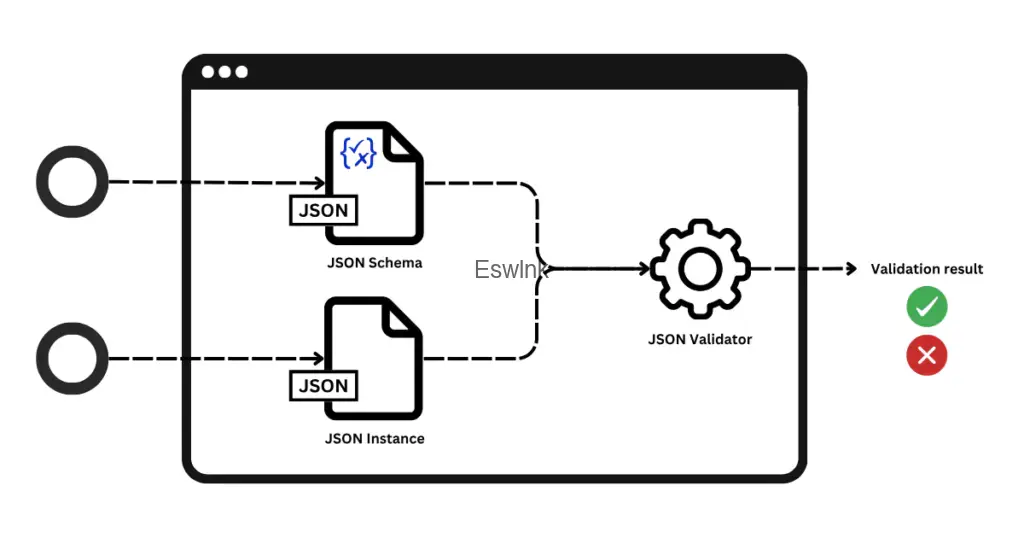
1. 创建一个基本的Spring Boot应用
首先,创建一个新的Spring Boot项目。如果你还不熟悉,可以参考Spring Boot的快速入门。
2. 添加JSON Schema Validator依赖
在pom.xml中添加json-schema-validator依赖:
<dependency>
  <groupId>com.networknt</groupId>
  <artifactId>json-schema-validator</artifactId>
  <version>1.4.0</version>
</dependency>
3. 创建JSON Schema
在src/main/resources目录下创建一个validation.json文件,定义JSON数据的结构和验证规则。例如:
{
  "$schema": "http://json-schema.org/draft-07/schema#",
  "title": "Order Event",
  "description": "Order event schema for example",
  "required": ["order_id", "total_price", "products"],
  "properties": {
    "order_id": {
      "type": "string"
    },
    "event": {
      "enum": ["PLACED", "DELIVERED", "RETURNED"],
      "type": "string"
    },
    "total_price": {
      "type": "number",
      "minimum": 0
    },
    "products": {
      "type": "array",
      "items": {
        "additionalProperties": true,
        "required": ["product_id", "price"],
        "minItems": 1,
        "properties": {
          "product_id": {
            "type": "string"
          },
          "price": {
            "type": "number",
            "minimum": 0
          },
          "quantity": {
            "type": "integer"
          }
        }
      }
    }
  }
}
4. 创建 JsonSchema 的 Bean
通过Spring管理JsonSchema实例:
@Configuration
public class JsonSchemaConfiguration {

    private static final String SCHEMA_VALIDATION_FILE = "/validation.json";

    @Bean
    public JsonSchema jsonSchema() {
        return JsonSchemaFactory
                .getInstance(SpecVersion.VersionFlag.V7)
                .getSchema(getClass().getResourceAsStream(SCHEMA_VALIDATION_FILE));
    }
}
5. 使用 JsonSchema
创建一个服务来验证JSON数据:
@Slf4j
@Service
public class JsonSchemaValidationService {

    @Autowired
    private JsonSchema jsonSchema;

    public String validateJson(JsonNode jsonNode) {
        Set<ValidationMessage> errors = jsonSchema.validate(jsonNode);
        if (errors.isEmpty()) {
            log.info("Event is valid");
            return "Event is valid";
        } else {
            log.info("Event is invalid: {}", errors);
            return errors.toString();
        }
    }
}
6. 在 Web 层的应用
创建一个Controller来接收和校验客户端发送的JSON数据:
import com.fasterxml.jackson.databind.JsonNode;
import org.springframework.beans.factory.annotation.Autowired;
import org.springframework.web.bind.annotation.*;

@RestController
public class JsonSchemaController {

    @Autowired
    private JsonSchemaValidationService service;

    @PostMapping("/test")
    public String validateEvent(@RequestBody JsonNode jsonNode) {
        return service.validateJson(jsonNode);
    }
}
7. 测试
启动Spring Boot应用,使用HTTP客户端工具(如Curl)发送测试请求:
符合规则的合法请求:
curl --location 'localhost:8080/test' \
--header 'Content-Type: application/json' \
--data '{
  "order_id": "order134",
  "event": "PLACED",
  "products": [
    {
      "product_id": "product_1",
      "price": 20.5,
      "quantity": 2
    }
  ],
  "total_price": 41
}'响应为[],表示没有错误。
不符合规则的非法请求(缺少order_id):
curl --location 'localhost:8080/test' \
--header 'Content-Type: application/json' \
--data '{
  "event": "PLACED",
  "products": [
    {
      "product_id": "product_1",
      "price": 20.5,
      "quantity": 2
    }
  ],
  "total_price": 41
}'响应为[$.order_id: is missing but it is required],表示校验失败并返回错误信息。
以上步骤展示了如何在Spring Boot应用中使用JSON Schema校验复杂JSON数据,从而确保数据的结构和内容符合预期。



评论 (0)